Scheduled publications are being published incorrectly

Yurensiy

Member
Community Supporter
Points 8
Solutions 0
It will be difficult to explain, but I will try.

I create a post in the evening and schedule it for the morning. For example, for 7 AM. Yes, it publishes, but it's not at 7 AM, but at the time I scheduled it. So, it's only visible from 7 AM onward, but the publishing time is in the evening.
Either I configured something incorrectly, or it's a bug.
 
I just tested it on your website by setting a scheduled post for 23:22, and it seems to have posted correctly.

So when you say it posts at the time you schedule it, for example, if you schedule it at 10 pm but want it to post at 7 am, are you saying it will post at 10 pm? not 7 am
 
No, it will be published at 7, but the time will be set back several times, as if it was published at 22.
 
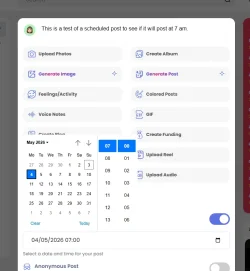
Is this how you scheduled it?

Screenshot 2026-05-03 232845.webp
 
I posted at __:45 and will publish a regular post in five minutes. And when the scheduled post is published, everything will immediately become clear.
 
I didn't quite understand this question.
What I was asking from the image, if you were scheduling a post for 7 a.m., is that how you scheduled it? Using that screen and selecting 7:00 for 7am
 
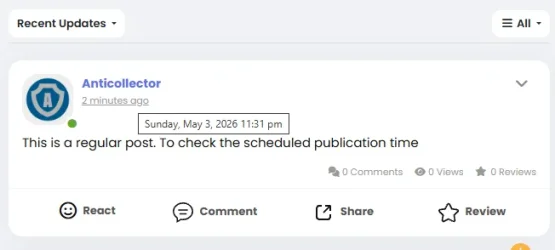
Screenshot 2026-05-03 233236.webp

That all looks fine, from my end, the time is matching up from what I can see.
 
The only thing that is coming to mind just now is: what time zone is your server set to?
 
What I was asking from the image, if you were scheduling a post for 7 a.m., is that how you scheduled it? Using that screen and selecting 7:00 for 7am
Yes
 
View attachment 300

That all looks fine, from my end, the time is matching up from what I can see.
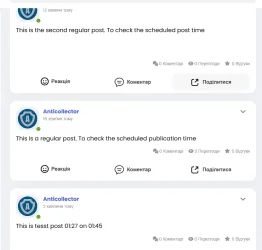
These are regular posts. In 45 minutes, a delay of __:45 will appear and it will be in front of them, as if it was published earlier, not at __:45 (I just don't know what time it is)))
 
And I don't know)
upload this time.php file to the root folder of your website, then run the file like this.

This will give you your current server time. See if it matches your local time.
=== Server Timezone Info === Timezone : UTC UTC Offset: +00:00 Local Time: 2026-05-03 22:37:22
 

Attachments

I don't understand what is wrong with it. It all looks fine on my end.
 
=== Server Timezone Info === Timezone : Africa/Abidjan UTC Offset: +00:00 Local Time: 2026-05-03 22:49:10
And in our time it is 01:49
 
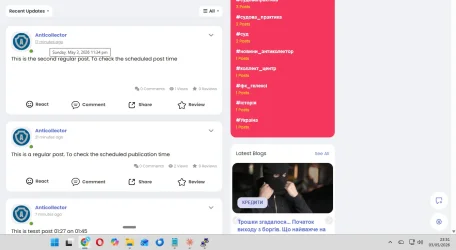
Screenshot 2026-05-03 235205.webp

If you take this image, for instance, the first post shows that it was posted at 11:34. And it says it was posted 17 minutes ago. Now, if you look at the clock at the bottom right-hand corner of the screen on the image, you will see that, if you count back on that, it was posted at the correct time.
 
View attachment 303

If you take this image, for instance, the first post shows that it was posted at 11:34. And it says it was posted 17 minutes ago. Now, if you look at the clock at the bottom right-hand corner of the screen on the image, you will see that, if you count back on that, it was posted at the correct time.
Yes, but the one delayed for __:45 was published at __:45, but its time was clearly earlier, since two posts were published earlier than it was supposed to appear)
 
I will need to see a video of the full process that you are doing so I can get a better understanding, as I'm not quite getting what you're saying. When I scheduled a post on your website to post at 23:22, when the clock got to 23:22, it posted perfectly fine, so I'm not understanding what you're seeing at your end.
 

Donate: Campaign

Total amount
$0.00
Goal
$60.00

AdSense

Back
Top